Reading DMARC Reports
Learn how to interpret DMARC aggregate and forensic reports to understand your email authentication status.
Report Types
Aggregate Reports (RUA)
Daily summaries of authentication results from receiving servers. Contains statistics about pass/fail rates, source IPs, and policy actions taken.
- Sent daily (usually)
- XML format, compressed
- No PII included
Forensic Reports (RUF)
Detailed reports for individual failed messages. Contains full message headers to help diagnose specific authentication failures.
- Sent per failure
- Contains message headers
- Limited provider support
Aggregate Report Structure
Aggregate reports contain metadata about the report and individual records for each source/result combination:
| Field | Description | Example |
|---|---|---|
| org_name | Organization that sent the report | Google Inc. |
| Contact email for the reporting org | noreply@google.com | |
| report_id | Unique identifier for this report | 12345678901234567890 |
| date_range | Time period covered by the report | begin: 1704067200, end: 1704153600 |
| domain | Your domain being reported on | example.com |
| policy_published | Your DMARC policy at time of report | p=reject; sp=reject |
Authentication Results
Each record shows the SPF and DKIM authentication results and the action taken:
Understanding Alignment
DMARC requires alignment between the From header domain and the authenticated domain. There are two alignment modes:
Relaxed Alignment (r)
The organizational domains must match. Subdomains are allowed.
mail.example.com aligns with example.comnews.example.com aligns with example.comStrict Alignment (s)
The domains must match exactly. No subdomain variations allowed.
example.com aligns with example.commail.example.com does not align with example.comTip: Start with relaxed alignment (default) while deploying DMARC. Switch to strict alignment once you have verified all legitimate sending sources.
Common Report Scenarios
High volume from unknown IPs
Unknown servers sending as your domain — likely spoofing attempts or misconfigured third-party services
SPF pass but DKIM fail
Email sent from authorized IP but missing or invalid DKIM signature
DKIM pass but SPF fail
Valid DKIM signature but sent from unauthorized IP
Forwarded mail failures
Legitimate emails failing after being forwarded by recipients
Where reports land in DDMARC
DDMARC parses every report as it arrives and spreads the results across several pages. These are the ones you will use most when working through report data:
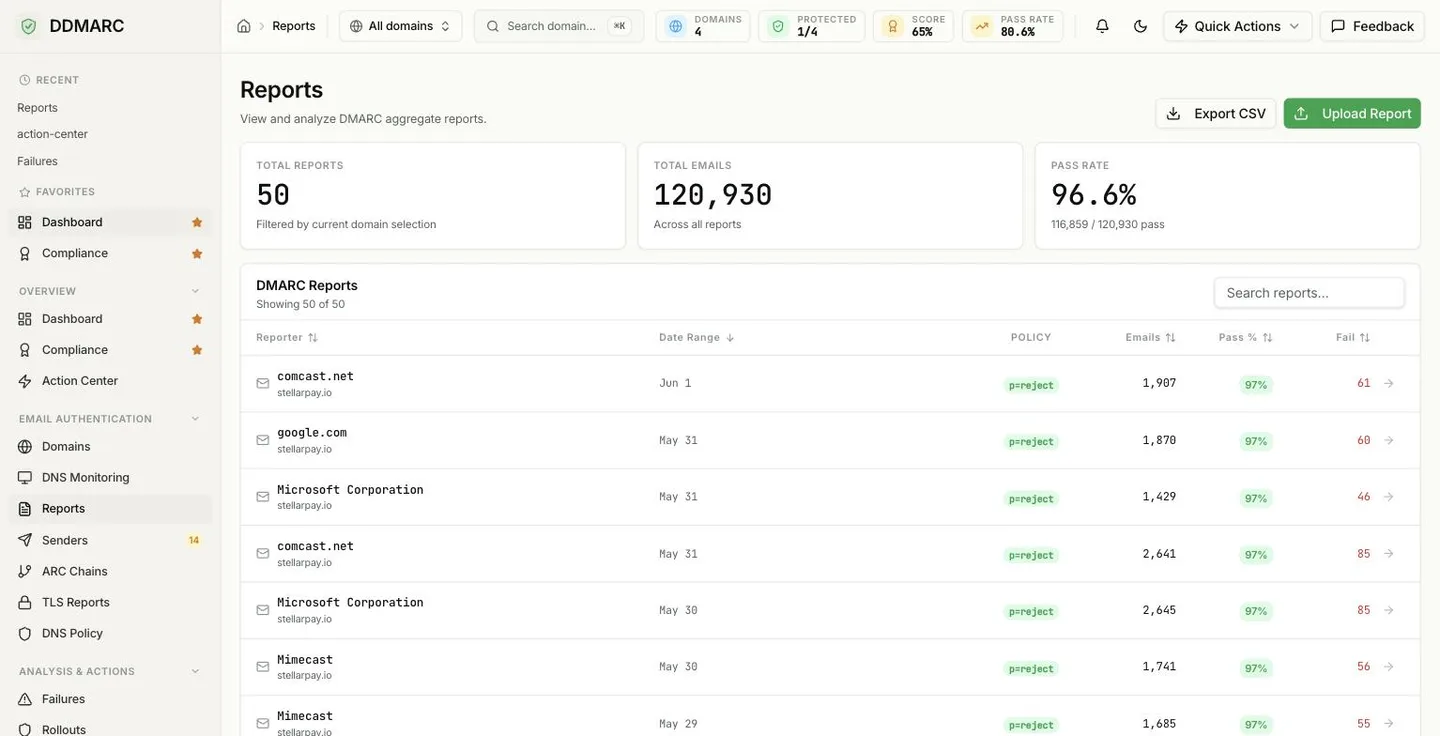
Reports
Every aggregate report, by reporter and period. Open one to see the per-source records inside it.
Senders
The sender inventory built for you from report data — each service, its IPs, pass rates, and how to fix it.
Failures
Root-cause classification for failing mail, spoof campaign clusters, and suggested fixes per source.
Compliance
Per-domain scores and grades with the single highest-impact issue for each domain.
Action Center
The same findings turned into a prioritized worklist, worst domains first.
Notifications
Alerts for sudden drops in pass rate, new failing sources, and DNS record changes.
Going from “something failed” to “here is the fix”
Aggregate reports tell you that mail failed, not why. The Failures page does that step for you:
- Failures grouped by root cause, each with a concrete fix and links to the senders involved
- Spoof campaign clusters — related failures grouped by IP range, From: domain, and week
- Top failing sources and the most-spoofed header-From domains
- A failure trend with anomalies highlighted, over 7 to 90 days
- Time-to-resolution stats for DNS misconfigurations, derived from monitoring checks
- Recent forensic (RUF) samples where the receiver sent them
Full walkthrough: Failure Analysis.
Report Analysis Best Practices
- Review reports weekly during initial DMARC deployment
- Investigate any unknown IPs before tightening policy
- Document all legitimate sending sources in a sender inventory
- Set up alerts for sudden changes in pass/fail rates
- Compare reports across multiple providers for a complete picture