Failure Analysis
Deep-dive into authentication failures, with root-cause classification and forensic samples. Every failing message in your reports is sorted into a named cause that carries a severity, a share of the total, and a concrete fix — so you can tell a broken DKIM selector apart from someone forging your domain.
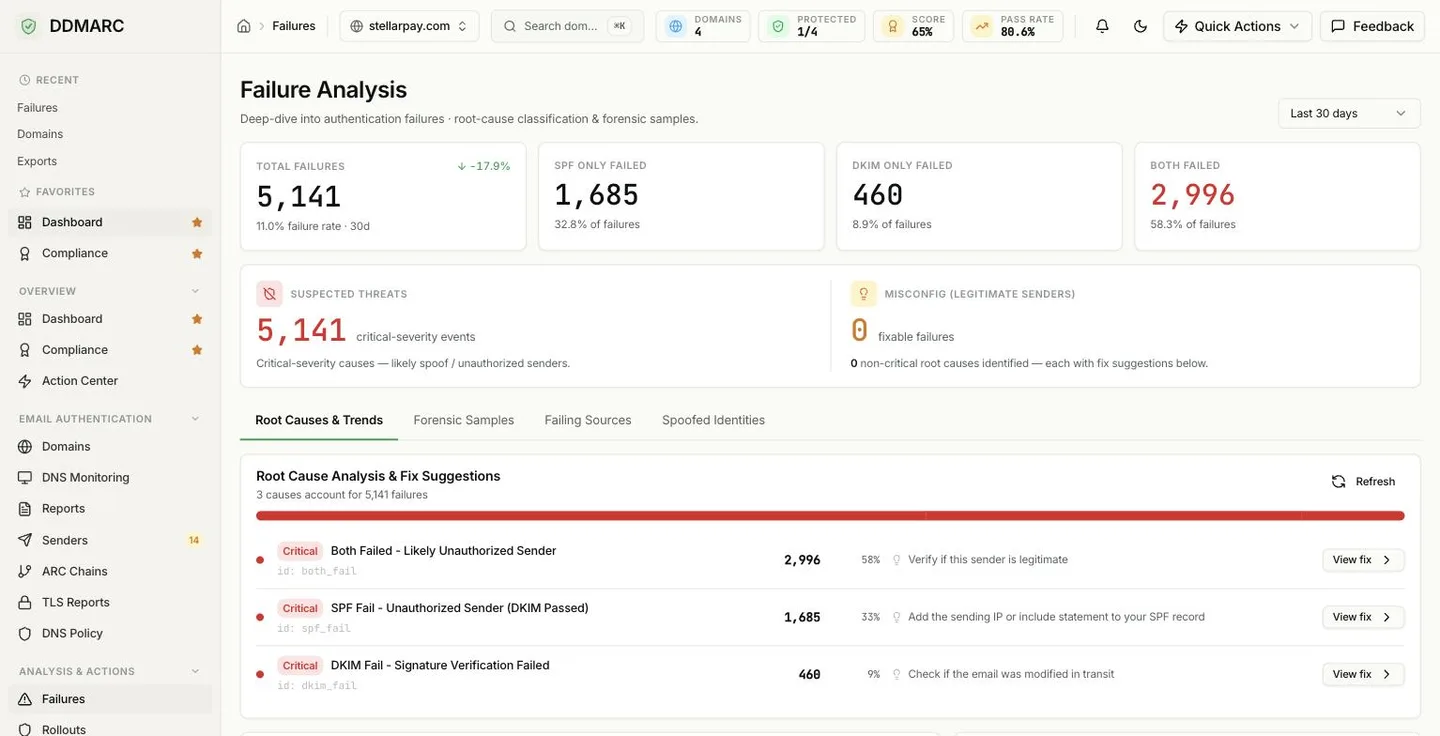
The four counters
The tiles split every failing message by which mechanism let it down. A message counts as a failure when SPF or DKIM did not pass.
Total Failures
All failures in the selected window, with the overall failure rate and the change against the first half of the same window.
SPF Only Failed
SPF did not pass but DKIM did. Very often forwarding, not abuse.
DKIM Only Failed
DKIM did not pass but SPF did. Usually a signing or key problem on a source you own.
Both Failed
Neither mechanism passed. This is the bucket that contains spoofing.
Threats vs. misconfiguration
The split panel under the tiles divides the same failures into the ones worth investigating and the ones worth fixing.
Suspected Threats
Messages whose root cause was classified as critical severity — likely spoofing or genuinely unauthorized senders. Start here when the number is non-zero.
Misconfig (legitimate senders)
Everything that was not critical — warning and informational causes. These are fixable failures from senders that are almost always yours, and each one comes with a fix suggestion in the list below.
The four tabs
Root Causes & Trends
The classified cause list with fix suggestions, a stacked failure trend for the window, and time-to-resolution statistics.
Forensic Samples
Individual failed-message samples reported back by receivers, with their authentication headers. Plan-gated.
Failing Sources
Per-IP table: source IP and PTR, ASN organization, country, primary issue, claimed From domains and failure count.
Spoofed Identities
The From: domains most often forged in failing mail, plus clustered spoof campaigns.
How a failure is classified
Classification is deterministic and comes from the SPF and DKIM results reported for each record:
Neither passed → both_fail, critical. The single most important bucket on the page.
SPF passed, DKIM did not → the specific DKIM cause for that result (dkim_fail, dkim_none, dkim_permerror, …), falling back to spf_pass_dkim_fail.
DKIM passed, SPF did not → the specific SPF cause, labeled (DKIM Passed) and softened from warning to informational, because a valid DKIM signature means the original sender is still verified. With no specific SPF result it becomes spf_fail_dkim_pass.
Root cause reference
Each row in the Root Causes list shows a severity badge, the stable cause id, the failure count, its share of all failures, a one-line fix, and a View fix action that expands to the full suggestion list plus the top failing sources for that cause — each linking to the matching sender so you can use guided remediation.
| Cause id | Severity | Raised when | Suggested fix |
|---|---|---|---|
both_fail Both Failed — Likely Unauthorized Sender | critical | Neither SPF nor DKIM passed. | Verify the sender is legitimate; if it is, add it to SPF and configure DKIM signing. If not, block it and report abuse. |
spf_fail SPF Fail — Unauthorized Sender | critical | SPF returned fail for the sending IP. | Add the sending IP or an include to your SPF record, or confirm the source is a third-party service you actually use. |
spf_permerror SPF Permanent Error — Record Invalid | critical | The SPF record has a syntax error or exceeds its limits. | Validate the record, stay within 10 DNS lookups, and remove duplicate or circular includes. |
spf_none SPF None — No Record Found | critical | The sending domain publishes no SPF record. | Create an SPF record covering every legitimate sending source. |
spf_softfail SPF Softfail — Sender Not Fully Authorized | warning | The record ends in ~all and the sender is not listed. | Add the missing sender, then consider tightening ~all to -all once the list is complete. |
spf_temperror SPF Temporary Error — DNS Lookup Failed | warning | The SPF lookup failed transiently. | Check DNS availability and response times, and reduce lookups if you are near the limit. |
spf_neutral SPF Neutral — Explicitly No Statement | info | The record uses ?all for this sender. | Move to ~all or -all for meaningful protection. |
dkim_fail DKIM Fail — Signature Verification Failed | critical | A DKIM signature was present but did not verify. | Check whether the message was altered in transit, verify the key pair, and confirm the published public key. |
dkim_permerror DKIM Permanent Error — Key Invalid or Missing | critical | The key record could not be parsed or was not found. | Confirm the record exists at selector._domainkey, check its syntax, and make sure a rotation did not skip DNS. |
dkim_none DKIM None — No Signature Present | warning | The message carried no DKIM signature at all. | Enable DKIM signing on the mail server or provider sending this traffic. |
dkim_temperror DKIM Temporary Error — DNS Lookup Failed | warning | The public key could not be retrieved. | Check DNS availability and that the selector record exists. |
dkim_policy DKIM Policy Fail — Sender Policy Issue | warning | DKIM failed because of the signing policy. | Review signing policies and confirm all required headers are signed. |
dkim_neutral DKIM Neutral — Signature Not Evaluated | info | The signature was not evaluated. | Usually a configuration issue — re-check DKIM setup. |
spf_pass_dkim_fail SPF Pass, DKIM Fail — DKIM Configuration Issue | warning | SPF authorized the sender but DKIM failed for a reason with no more specific code. | Fix or enable DKIM signing for this sender; check whether a key rotation is due. |
spf_fail_dkim_pass SPF Fail, DKIM Pass — Likely Email Forwarding | info | SPF failed but DKIM verified — the classic forwarding signature. | Usually normal for forwarded mail. DKIM passing means the original sender is verified. |
Causes are also grouped into categories so you can see, for example, that most of your volume is one SPF configuration problem, not fourteen unrelated ones.
Cause categories
Unauthorized Senders
unauthorized
Both SPF and DKIM failed — likely spoofing
Unauthorized Senders (SPF)
spf_unauthorized
Mail from IPs that are not in your SPF record
SPF Configuration Issues
spf_config
Problems with SPF record setup or syntax
Email Forwarding (SPF)
spf_forwarding
SPF failures caused by legitimate forwarding
DKIM Configuration Issues
dkim_config
Missing signatures or DKIM setup problems
DKIM Signature Issues
dkim_signature
Signatures that failed verification
DKIM Key Issues
dkim_key
Problems retrieving or validating DKIM keys
Alignment Issues
alignment
Domain alignment failures between headers
Unknown Issues
unknown
Failures that could not be categorized
Refresh
The Refresh control on the Root Cause card refetches every failure-analysis query on the page at once — summary, sources, trend, spoofed identities and root causes — so the whole view moves to the same point in time. It is disabled while a refresh is in flight.
Forensic Samples require Protect or above
Forensic (RUF) reports are included from the Protect plan upward. On lower tiers the tab shows an upgrade prompt instead of samples. Samples only exist at all when receivers honor the ruf= tag on your DMARC record — many do not. See Forensic Reports.
Included from Protect ($29/mo).Start a 14-day trial →See the Protect plan →
Spoof campaign clusters
The Spoofed Identities tab groups messages where both SPF and DKIM failed — the likely-spoof signal — into clusters that share three things:
The same network
A /24 for IPv4, a /64 for IPv6.
The same forged From
The header-From address being impersonated.
The same calendar week
So a burst reads as one campaign, not dozens of rows.
A cluster that involves two or more distinct IPs in the range is flagged as distributed — a coordinated-campaign signal, not one misbehaving host. Each cluster also carries its message count, the countries and ASN organizations involved, and first/last seen timestamps.
Time to resolution
The Root Causes tab also reports how long DNS misconfigurations stay broken. An episode opens at the first DNS check where an SPF, DKIM or DMARC record is missing or invalid, and closes at the first check where it is valid again. You get a median time to resolution, counts of resolved and still-open episodes, and a distribution histogram.
Precision is bounded by how often checks run and by DNS check-history retention, so treat the median as a trend indicator, not an exact SLA measurement. See DNS Monitoring for how those checks are scheduled.
Scope and time window
- The period selector in the header covers 7, 14, 30, 60 and 90 days; the underlying API accepts any window from 1 to 365 days.
- When you are scoped to a single domain, every tab, tile and cause count narrows to that domain.
- How far back you can look is capped by your plan's data retention.
API endpoints
All nine endpoints are GET, scoped to your organization, and accept days and an optional domain_id.
| Path | Returns |
|---|---|
| /api/v1/failure-analysis/summary | Totals and the SPF-only / DKIM-only / both breakdown |
| /api/v1/failure-analysis/root-causes | Classified causes with severity, share and fix suggestions |
| /api/v1/failure-analysis/root-causes/by-source | The same causes, grouped per failing source IP |
| /api/v1/failure-analysis/sources | Top failing source IPs with ASN, country and primary issue |
| /api/v1/failure-analysis/spoof-clusters | Spoof campaign clusters by IP range, forged From and week |
| /api/v1/failure-analysis/by-header-from | Most-spoofed header-From domains |
| /api/v1/failure-analysis/trend | Daily failure counts split by SPF / DKIM / both |
| /api/v1/failure-analysis/resolution-stats | Time-to-resolution for DNS misconfigurations |
| /api/v1/failure-analysis/patterns | Recurring failure patterns across the window |