Action Center
Domains that need your attention — worst first. Click any row to go directly to the fix. Where the Compliance page shows you the whole portfolio, the Action Center shows only what is broken, in the order you should work through it.
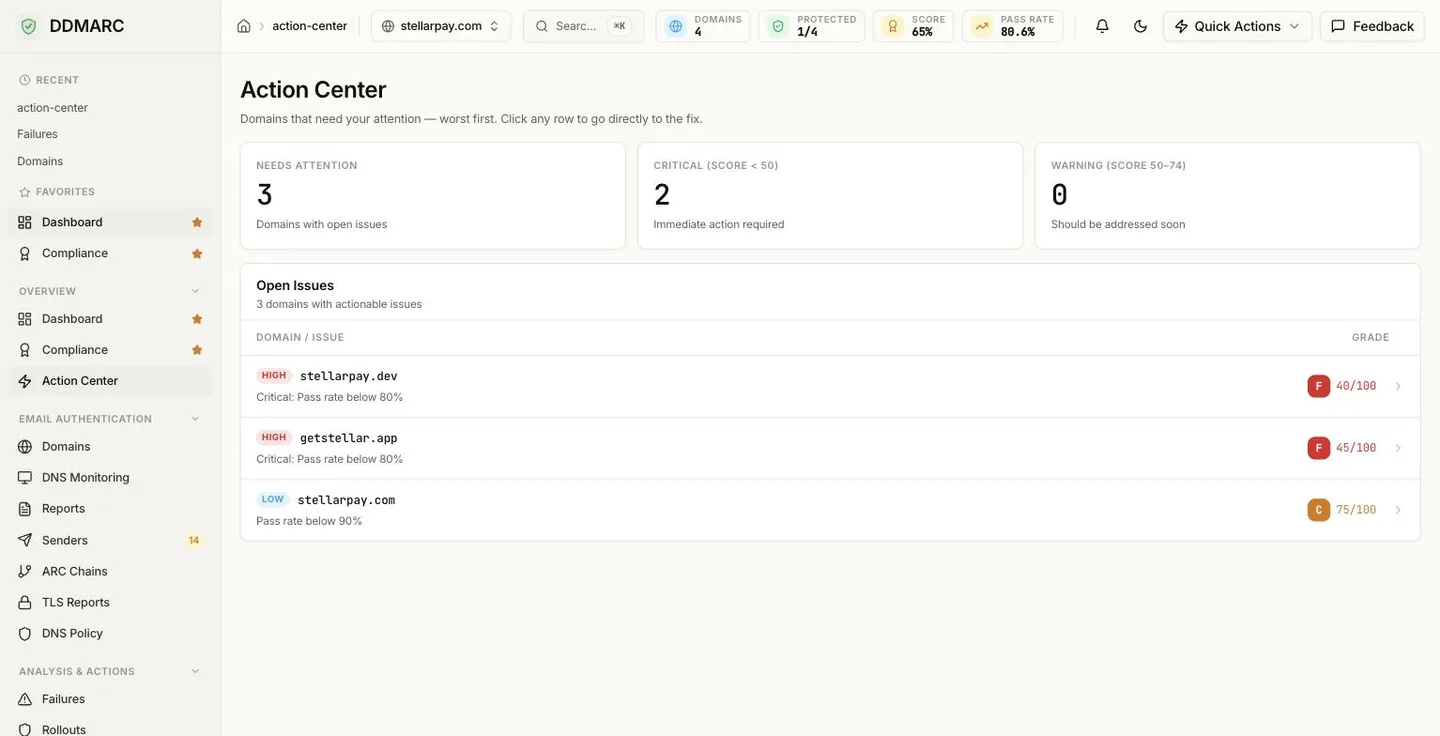
What shows up here
A domain appears in the Open Issues table when it has an identified top issue and a compliance score below 100. Rows are sorted by score ascending, so the domain in the worst shape is always first. Domains scoring a clean 100 with nothing outstanding never appear.
The empty state is the goal
When nothing qualifies, the page says all domains are in good shape. That is the state to aim for — keep monitoring so it stays that way.
The three tiles
Needs Attention
How many domains have open issues — the number of rows in the table below.
Critical (score < 50)
Immediate action required. These usually mean a missing record, not a tuning problem.
Warning (score 50–74)
Should be addressed soon. Typically a pass-rate or policy-progression issue.
Row severity badges
Each row carries a severity badge derived from the same score:
Score below 50.
Score from 50 to 74.
Score 75 or above with an issue still open.
These bands are not the A–F grades
The Action Center groups by Critical / Warning at 50 and 75, while the Compliance page groups the same domains into A–F letter grades on different cut-points. Both read the same underlying score, but they are two separate lenses on it — do not read them as one scale. The grade badge shown on each Action Center row is the letter grade, so a row can be labeled Warning and still show a C.
The Open Issues table
Domain / Issue
Severity badge and domain name, with the top issue underneath.
Grade
Letter grade plus the score, for example F 40/100.
Row link
The whole row is clickable and lands on the right tab of the domain workspace.
Where a row takes you
The destination tab is chosen from the issue text. Issues about policy, quarantine or reject open the domain's Policy tab; everything else opens the DNS tab, which is where missing records and record-level problems are fixed.
Issues you will see
Each domain contributes exactly one issue — the highest-priority finding from its compliance evaluation. Fix it, and the next one surfaces on the following refresh.
| Issue | What it means |
|---|---|
| Add DMARC record | No DMARC record was detected for the domain. |
| Add SPF record | No SPF record was detected. |
| Configure DKIM signing | No DKIM signing was detected on this domain's mail. |
| Critical: Pass rate below 80% | Fewer than four in five messages authenticate. |
| Improve SPF pass rate | SPF is passing on under 90% of messages. |
| Improve DKIM pass rate | DKIM is passing on under 90% of messages. |
| Improve pass rate before policy upgrade | The domain is on p=none and is not yet clean enough to enforce. |
| Upgrade policy to quarantine | The domain is on p=none but already authenticates well — time to enforce. |
| Consider reject policy | The domain is on p=quarantine with a very high pass rate. |
| Pass rate below 90% | A milder version of the pass-rate warning. |
| SPF pass rate below 95% | Close, but not clean. |
| DKIM pass rate below 95% | Close, but not clean. |
| Verify domain ownership | The domain has not completed ownership verification. |
Where the data comes from
The Action Center adds no new data source — it reads the same compliance scorecard the Compliance page uses (/api/v1/dashboard/compliance-scorecard) and filters it down to the rows that need work. If a score looks wrong here, it will look the same on the Compliance page, and the scoring rules are documented there.