Data Exports
DDMARC exports three datasets as CSV: DMARC reports, senders, and your activity log. Use them for offline analysis, audit evidence, or to feed a BI tool or SIEM.
Exports require the Protect plan or higher
Available on Protect, Growth, Professional, Enterprise, Partner Starter and Partner. On the free Monitor plan the Exports page is locked.
Included from Protect ($29/mo).Start a 14-day trial →See the Protect plan →
Where to find it
Exports is a top-level page in the Management section of the sidebar: Dashboard → Management → Exports. Pick a dataset, set the options, and download.
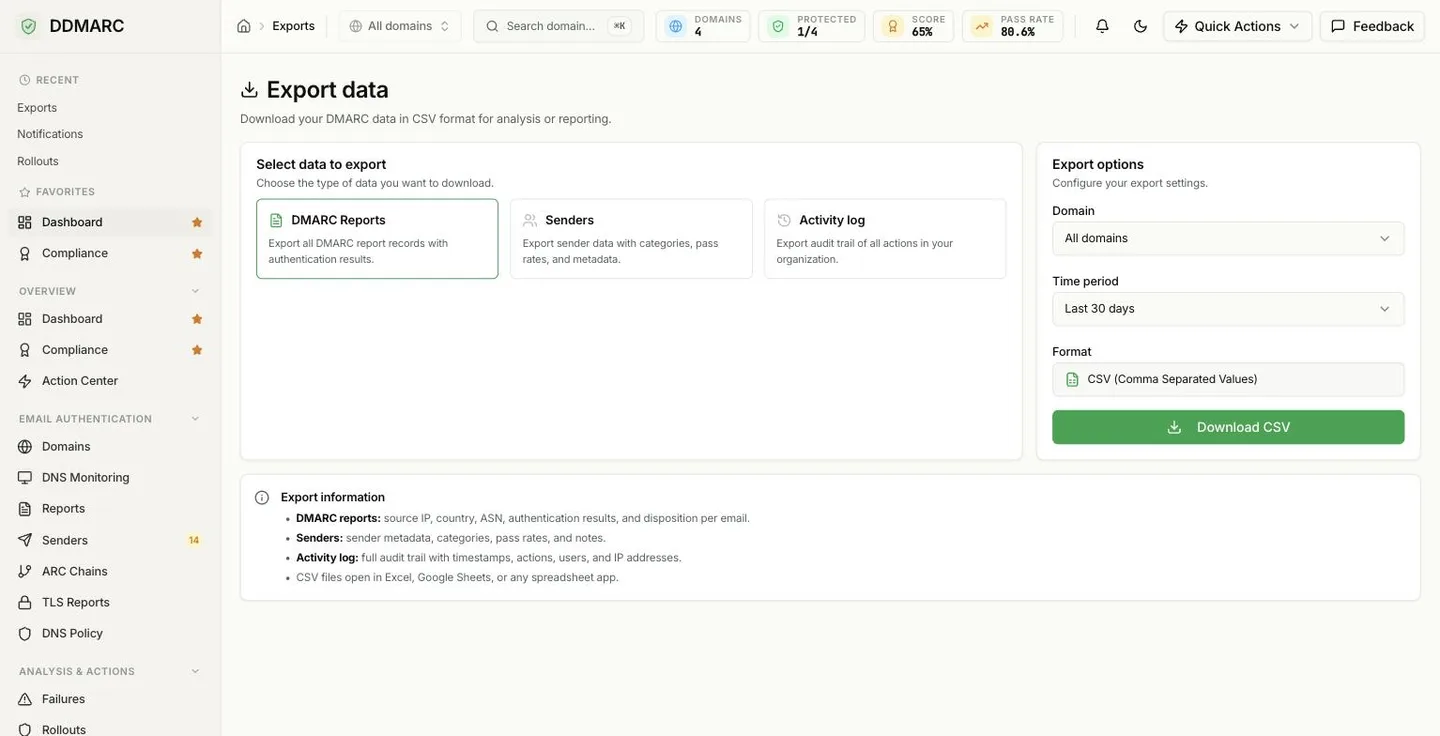
The three exports
DMARC Reports
CSVOne row per record in your aggregate reports: sending source, disposition and SPF/DKIM results.
- Endpoint
- GET /api/v1/reports/export/csv
- Filters
- Domain (optional), time period
- Time period
- 7, 14, 30, 60, 90, 180 or 365 days
Senders
CSVYour sender inventory with category, volume, pass rate and first/last seen dates.
- Endpoint
- GET /api/v1/senders/export/csv
- Filters
- Domain (optional), sender category (optional)
- Time period
- Not applicable — exports the full inventory
Activity log
CSVThe audit trail of actions taken in your organization, including support-impersonation attribution.
- Endpoint
- GET /api/v1/activity/export/csv
- Filters
- Action type (optional), time period
- Time period
- Up to 90 days
Export options
The Exports page offers three controls. There is no custom start/end date entry — pick one of the fixed periods.
| Option | Choices | Applies to |
|---|---|---|
| Domain | All domains, or a single domain | DMARC Reports, Senders |
| Time period | Last 7, 14, 30, 60 or 90 days. DMARC Reports also offers 6 months and 1 year. | DMARC Reports, Activity log |
| Format | CSV | All three |
Limits you should know about
DMARC Reports
- Rate limited to 10 exports per hour.
- Capped at 500,000 rows per file.
- The requested period is clamped to your plan's retention window.
Activity log
- Capped at 50,000 of the newest rows.
- A response header flags the file when it was truncated — page through the JSON API if you hit it.
- Maximum window is 90 days.
CSV columns
Files are standard comma-separated CSV with a header row, readable by Excel, Numbers, Google Sheets and any CSV parser.
Date,Domain,Reporter,Source IP,Country,Organization,Count,Disposition,DKIM Result,SPF Result,Header From,Envelope FromDomain,Organization/ASN,Source IP,Header From,Category,Display Name,Country,Total Emails,Passed,Failed,Pass Rate %,First Seen,Last Seen,NotesHow far back you can export
Report exports never reach further back than your plan's retention window, whatever period you pick:
Automating exports with the API
Each export is a plain authenticated GET that streams a CSV body:
GET /api/v1/reports/export/csvdays accepts 1–365 for reports and 1–90 for the activity log. The senders export takes domain_id and category instead. See the Reports API documentation for authentication details.
What exports do not cover
Not available yet — Forensic and domain-summary CSV exports
Only DMARC reports, senders and the activity log can be exported. There is no CSV export for forensic (RUF) reports or for a domain-configuration summary. To work with forensic data, use the Forensic Reports page in the dashboard.
Not available yet — Custom date ranges and result-level export filters
Exports accept the fixed time periods listed above only — there is no arbitrary start/end date. You also cannot filter an export by authentication result, source IP or reporting organization; filter the resulting CSV in your spreadsheet or BI tool instead.
Common use cases
Audit evidence
Attach the activity-log CSV to an access-review or change-control record.
Data analysis
Load the reports CSV into a BI tool to slice volume and pass rate by source.
Sender inventory reviews
Export senders before a quarterly review of who is allowed to send as you.
SIEM ingestion
Schedule the API export and feed the rows into your detection pipeline.