Lookalike Domains
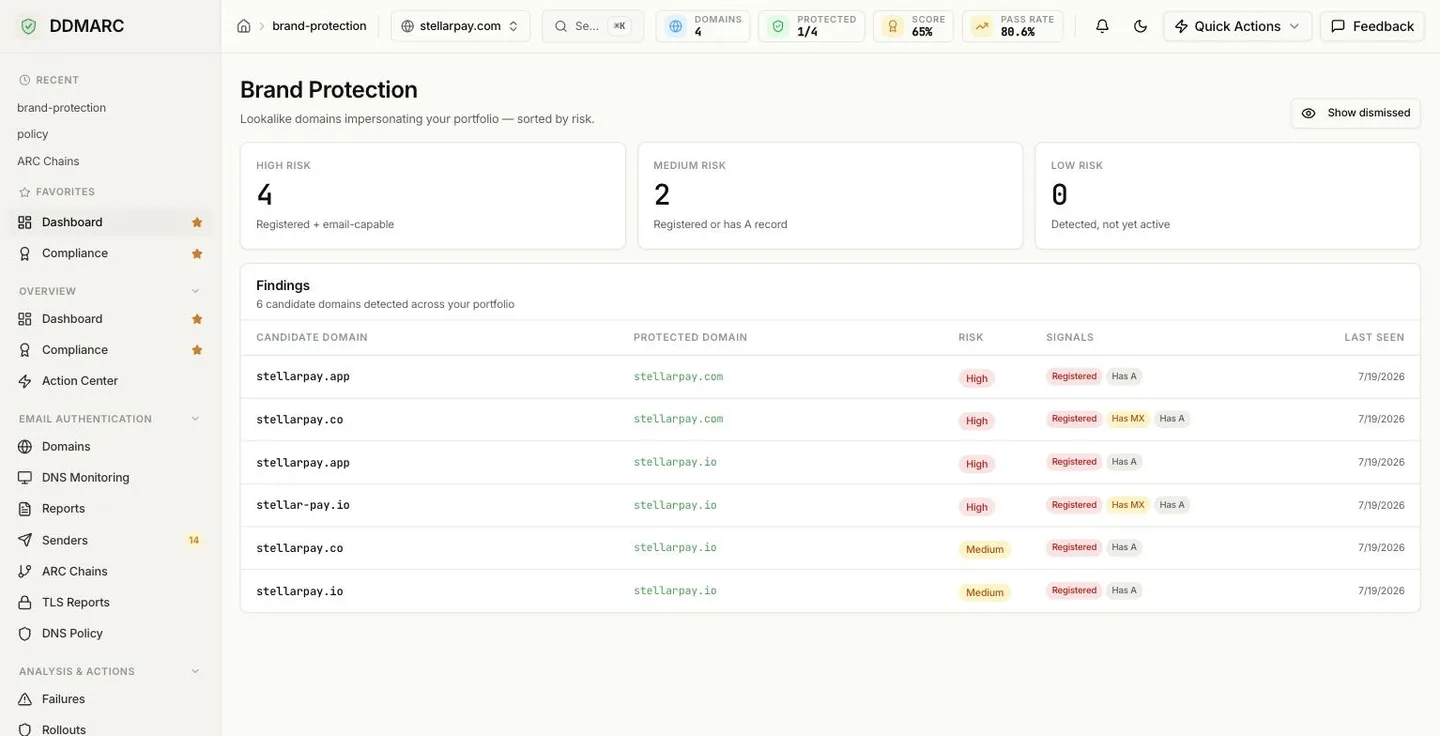
Lookalike domains impersonating your portfolio — sorted by risk. DMARC stops attackers spoofing your domain; it does nothing about someone registering a domain that merely looks like yours. This is where you find those.
In the dashboard the sidebar entry is Lookalike Domains, under Analysis & Actions, and the page it opens is headed Brand Protection. They are the same page.
Professional plan feature
Lookalike domain detection is available on Professional, Enterprise, Partner Starter and Partner plans. On other plans the sidebar entry is hidden and both the page and the API return an upgrade prompt.
Included from Professional ($99/mo).Start a 14-day trial →See the Professional plan →
The gap DMARC leaves open
Once you are at p=reject, an attacker can no longer put your domain in the From address and expect delivery. So they stop trying. They register something adjacent instead — a swapped letter, a doubled character, a different top-level domain, a hyphen inserted in the middle — and send from that. It passes SPF, DKIM and DMARC perfectly, because it is a legitimate domain. It is simply not yours.
Nothing in your DMARC data will show this, because none of that mail claims to be you. Detection has to start from the name itself.
How candidates are found
Permutations of your domain name
A permutation engine generates the domains a human would plausibly mistake for yours or an attacker would plausibly register: character swaps and omissions, repeated letters, homoglyphs, keyboard-adjacent typos, hyphenation, and the same name under other top-level domains. Each finding records which technique produced it.
DNS resolution
Every candidate is resolved. A candidate that answers with A, MX or NS records is marked registered; the A and MX results become the signals shown in the table. The overwhelming majority of permutations resolve to nothing and stay low risk.
Enrichment on the ones that are real
Registered candidates get further checks: registration date (a domain registered in the last 30 days is treated as a strong threat signal in its own right), whether a TLS certificate has been issued for it in the Certificate Transparency logs, whether it is configured to send mail, whether it answers HTTP at all, and whether its nameservers belong to a domain-parking provider. A live page that is not parked is active infrastructure; a parked page is a real registration sitting dormant.
How risk is decided
The three tiles at the top of the page count findings by tier. The rules behind them:
Registered and able to send mail — it has MX records, is configured to send, or serves a live non-parked website. A registered candidate created within the last 30 days is also treated as high, whatever else it has: fresh registrations are how campaigns start.
Registered and showing some presence — an A record, a TLS certificate issued in the Certificate Transparency logs, or any HTTP response — but no mail capability. Someone owns it and has done something with it. Worth watching, not yet an active threat.
Everything else: the permutation exists as a possibility but nothing is live behind it. These are the bulk of results, and they are useful as a watch list — a low-risk finding that turns high is exactly the early warning you want.
Findings are always returned high risk first, then medium, then low, and most recently seen first within each tier.
Reading the Findings table
Each row pairs a Candidate Domain with the Protected Domain of yours it imitates — the protected domain links straight into its workspace. Then the Risk badge, the Signals chips, and Last Seen, the date the candidate was last confirmed by a scan.
Registered
The candidate resolves in DNS — someone owns it. Shown in red because a registered lookalike is no longer hypothetical.
Has MX
It has mail exchanger records, so it can send and receive email as that name. This is the signal that turns a lookalike into a phishing tool.
Has A
It resolves to an address, so something is hosted there — often a parked page, sometimes a copy of your site.
Dismissed
You have marked this finding as not a concern. Hidden by default; bring it back with Show dismissed.
Show dismissed
Dismissed findings are hidden by default so the list stays actionable. The toggle in the page header brings them back — useful when you want to re-check something you cleared months ago, or confirm that a domain you dismissed has not since sprouted MX records.
Running a scan
The Brand Protection page shows stored findings. To refresh them for a domain, trigger a scan:
POST /api/v1/domains/{domain_id}/lookalikes/scanOne scan per hour, per domain
A second scan inside the same hour returns 429. Scanning is expensive — hundreds of DNS lookups plus enrichment — and results do not change minute to minute.
Findings accumulate
A scan updates stored findings instead of replacing them, so first-detected and last-seen timestamps survive across runs and you keep the history of a candidate.
What to do with a finding
- Check it is not yours. Defensive registrations, regional variants and old acquisitions all show up here. Dismiss the ones you own.
- Prioritize mail capability. A high-risk finding with MX records can send convincing email as your brand today.
- Preserve the evidence. Registrar abuse reports and takedown requests want the domain, when it was first seen, and what it is doing — which is what the row already records.
- Tell the people who get phished. Finance and support teams benefit more from a list of the specific lookalikes in play than from a policy reminder.
Detection is not defense
DDMARC finds and ranks lookalikes. It cannot block them, and nobody can — the domains belong to someone else. Acting on a finding means a registrar abuse report, a takedown request, a defensive registration, or briefing the people who would be targeted.
API endpoints
| Method | Path | Purpose |
|---|---|---|
| GET | /api/v1/dashboard/lookalikes-rollup | Org-wide findings across every domain, with the high / medium / low breakdown |
| GET | /api/v1/domains/{domain_id}/lookalikes | Stored findings for one domain, ranked high to low |
| POST | /api/v1/domains/{domain_id}/lookalikes/scan | Run an on-demand scan for one domain |
The org-wide rollup accepts include_dismissed=true — the same switch the Show dismissed toggle flips.