Compliance
Overall DMARC compliance score per domain, with recommendations. The Compliance page is the portfolio view: one score and one letter grade for every domain, the distribution of those grades, how far along the enforcement journey your domains are, and the handful of fixes that would move the numbers most.
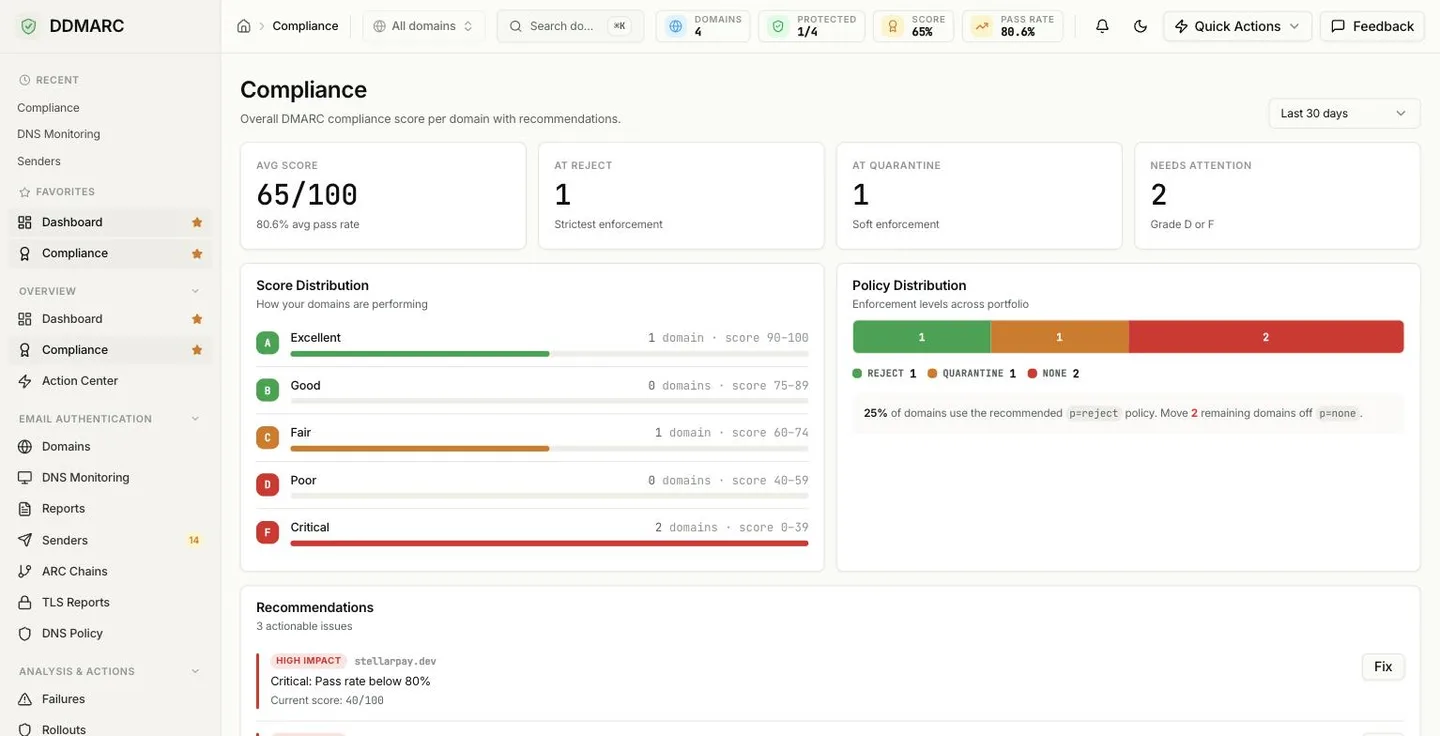
What the tiles mean
Avg Score
Mean compliance score across every domain in the organization, out of 100, with the average authentication pass rate underneath.
At Reject
Domains whose most recent report shows p=reject — strictest enforcement, and the goal state.
At Quarantine
Domains at p=quarantine — soft enforcement, part of the way there.
Needs Attention
Domains graded D or F. Grade captures both a weak policy and a weak pass rate, so this is a better "actually concerning" signal than counting policies alone.
How the score is calculated
Every domain starts at 100 and loses points for each problem found in the selected window. The score is floored at 0, so a domain cannot go negative no matter how many issues stack up.
| Finding | Points | Notes |
|---|---|---|
| No DMARC record detected | −40 | The single largest deduction. Nothing else matters until this is fixed. |
| DMARC policy is p=none | −20 | Monitoring only — no enforcement. |
| DMARC policy is p=quarantine | −10 | Partial enforcement. p=reject costs nothing. |
| No SPF record detected | −30 | |
| SPF pass rate below 90% | −15 | |
| SPF pass rate below 95% | −5 | Applied instead of the 15-point penalty, not on top of it. |
| No DKIM signing detected | −20 | |
| DKIM pass rate below 90% | −10 | |
| DKIM pass rate below 95% | −5 | Applied instead of the 10-point penalty. |
| Overall pass rate below 80% | −10 | |
| Overall pass rate below 90% | −5 | Applied instead of the 10-point penalty. |
| Domain ownership not verified | −5 |
The pass-rate bands are mutually exclusive: a domain at 92% SPF loses 5 points, not 20. The highest-priority finding for each domain becomes its Top Issue in the domain table and the text of its recommendation.
Score Distribution and grades
The Score Distribution card counts your domains into five grade bands so you can see the shape of the portfolio at a glance.
These bands apply to the compliance score on this page. The domain-level DNS security score uses the same letters plus an extra A+ band at 95 and above.
Policy Distribution
A single bar showing how many domains sit at each enforcement level across the portfolio: reject, quarantine and none. Any domain whose policy has not been seen in a report yet falls into a fourth, unknown segment.
The summary line underneath tells you what share of domains already use the recommended p=reject, and how many are still on p=none. Policy is read from each domain's most recent aggregate report, not from a live DNS lookup — so a policy you changed minutes ago shows up once reports covering it arrive.
Recommendations
A short, deliberately finite list: the worst-scoring domains that have an open issue and a score below 80, capped at four entries so the page stays actionable. Each entry shows an impact badge, the domain, the issue, the current score, and a Fix button that opens that domain's workspace.
Score below 50.
Score from 50 to 69.
Score from 70 to 79.
When nothing qualifies, the card says so — keep rotating DKIM keys and watching pass rates. For the full worst-first work queue instead of the top four, use the Action Center.
Domain Compliance table
Below the recommendations, every domain is listed with its grade, score out of 100, current policy badge and top issue. Rows link straight to the domain workspace. The period selector in the page header (7 to 90 days) rescopes the pass-rate inputs to the whole page.
Also on this page
Posture report (PDF)
Download a compliance posture report covering the last 30, 90 or 365 days — the artifact to hand to an auditor or a board pack.
Professional and aboveIncluded from Professional ($99/mo).Start a 14-day trial →See the Professional plan →
Bulk-sender compliance matrix
An organization-wide grid of domains against the bulk-sender requirements published by Google, Yahoo and Microsoft, with a pass / fix-needed / manual-check status per requirement. Domains that have never been DNS-checked show as not checked yet.
This is not the same number as the Security Score
The compliance score above is a deduction model driven by policy and authentication results. The DNS security score shown on a domain is a separate, weighted model over the DNS records themselves — DMARC 30, SPF 25, DKIM 25, MTA-STS 10 and BIMI 10 points. It also has one extra grade the compliance score does not: A+ at 95 and above.
In that model DNSSEC and DANE/TLSA are advisory only. They are reported with findings and remediation advice, but they contribute zero points and can never change the grade in either direction.
See Security Score for the full breakdown.
API
| Path | Returns |
|---|---|
| /api/v1/dashboard/compliance-scorecard | Per-domain score, grade, policy, pass rates and top issue, plus portfolio averages and policy counts. Accepts days and an optional domain_id. |
| /api/v1/dashboard/bulk-sender-matrix | Bulk-sender requirement status per domain and provider. |
| /api/v1/compliance/posture-report.pdf | The posture report as a PDF document. |