ARC Chain Monitoring
Track email authentication across forwarders and mailing lists — the Authenticated Received Chain (RFC 8617). ARC preserves the authentication result from the original hop so a receiver can still tell that a forwarded message was genuine.
In the dashboard: ARC Chains, under Email Authentication.
Growth plan feature
ARC chain monitoring is available on Growth, Professional, Enterprise, Partner Starter and Partner plans. On Monitor and Protect the page shows an upgrade screen.
Included from Growth ($69/mo).Start a 14-day trial →See the Growth plan →
Why ARC matters
Forwarding breaks email authentication, and it does so by design.
Forwarding breaks SPF
When a message is forwarded, the final delivery comes from the forwarder's server, not yours. That IP is not in your SPF record, so SPF fails at the receiving end — even though nothing malicious happened.
Mailing lists break DKIM
Lists routinely add a subject tag or an unsubscribe footer. Any change to a signed header or the body invalidates the DKIM signature, so DKIM fails too — and with both failing, DMARC fails.
ARC fixes this by having each intermediary seal the authentication results it observed before it made its changes. The receiver at the end of the chain can read that sealed history and conclude "SPF and DKIM did pass at the original hop; this list is one I trust to tell me so" — and deliver the message instead of applying your p=reject policy to it.
That last part is the catch: ARC is only worth as much as the trust the receiver places in the sealer. Monitoring tells you which intermediaries are handling your mail, whether their seals hold up, and which of them are not trustworthy enough to rescue a message.
Reading the page
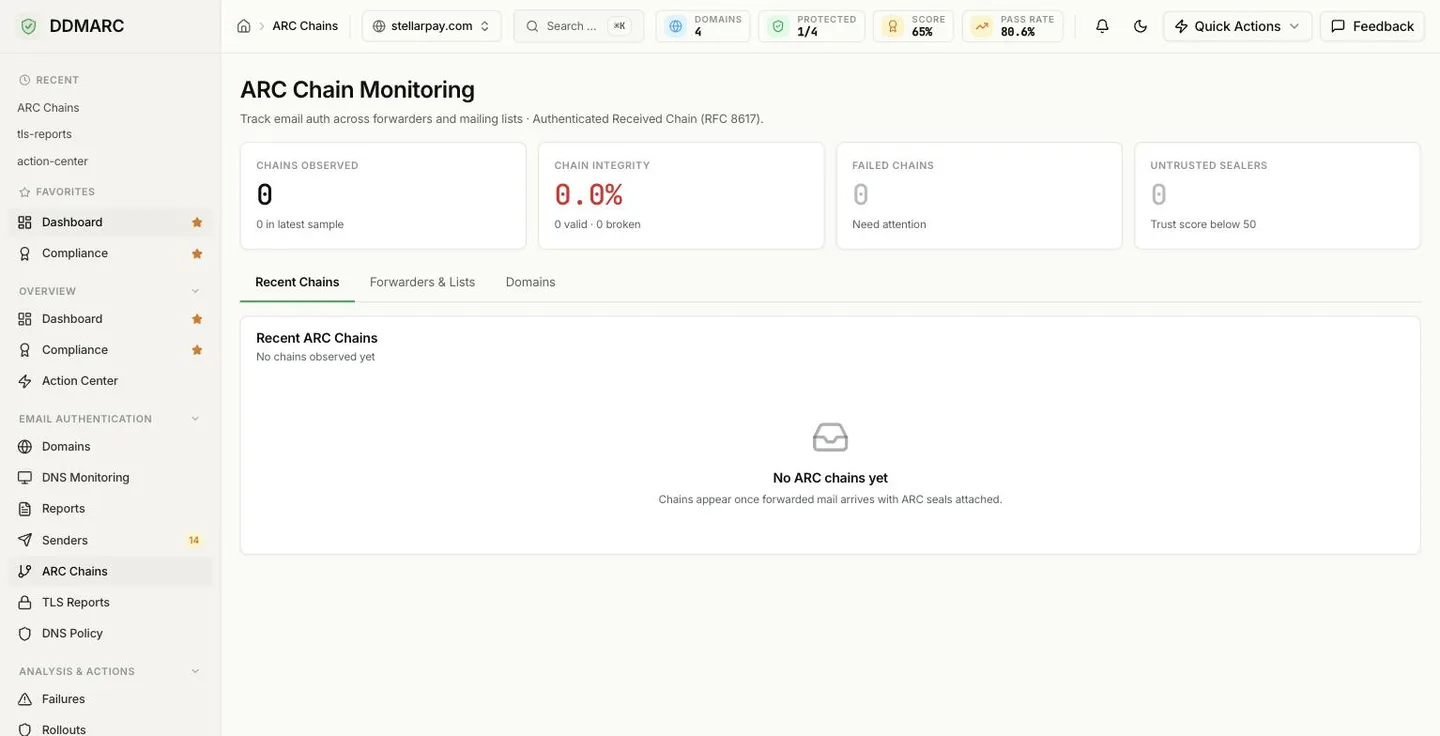
Chains Observed
How many ARC chains have been recorded in the period, with the size of the latest sample shown underneath.
Chain Integrity
Percentage of chains that validated, with the valid / broken split alongside. Green at 95% and above, amber from 80%, red below.
Failed Chains
Chains that did not validate — the ones that need attention.
Untrusted Sealers
Observed forwarders whose trust score is below 50.
The three tabs
Recent Chains
The latest chains observed, one row each: when it was received, the first hop and last hop domains, how many hops the message travelled through, and the chain validation result — Pass, Fail or None. Click a row to open the domain it belongs to.
Forwarders & Lists
The intermediaries seen most often in your chains, each with a chain-integrity bar and a trust-score pill. DDMARC ships with a database of well-known mailing lists, forwarding services, gateways and security gateways, recording whether each one supports ARC at all. Rows here are read-only — they reflect what was observed.
Domains
Your domains with a search box, for drilling into one domain's ARC detail instead of the org-wide view.
Before any chains arrive
ARC data is not something you configure — it is recorded as forwarded mail carrying ARC seals is processed for your verified domains. A domain whose mail is never forwarded and never goes through a mailing list will legitimately show nothing here.
Once chains do arrive, the same page fills in: the tiles count real chains, Recent Chains lists them, and Forwarders & Lists shows who is handling your mail.
What to do with what you see
- Falling chain integrity means intermediaries are breaking seals. Check which forwarder the failed chains share before you assume the problem is yours.
- Untrusted sealers handling significant volume are a real deliverability risk under enforcement — receivers are unlikely to honor their seals.
- Before moving to p=reject, look at which forwarding paths your mail actually takes. Chains that fail today are messages that will be rejected tomorrow. Pair this with a gated policy rollout.
- Do not read ARC failures as spoofing. A broken chain usually means a badly behaved intermediary, not an attacker — for impersonation, use the aggregate reports.
API endpoints
| Method | Path | Purpose |
|---|---|---|
| GET | /api/v1/arc-monitoring/overview | Org-wide totals, pass rate, top forwarders and the most recent chains |
| GET | /api/v1/arc-monitoring/domains/{domain_id}/chains | Chains recorded for one domain |
| GET | /api/v1/arc-monitoring/chains/{chain_id} | One chain with every hop and its authentication results |
| GET | /api/v1/arc-monitoring/domains/{domain_id}/analytics | Per-domain ARC analytics over time |
| GET | /api/v1/arc-monitoring/forwarders | Known forwarders and their trust scores |
| POST | /api/v1/arc-monitoring/forwarders | Add a known forwarder |
| PUT | /api/v1/arc-monitoring/forwarders/{forwarder_id} | Update a known forwarder |
| DELETE | /api/v1/arc-monitoring/forwarders/{forwarder_id} | Remove a known forwarder |