Activity log
Audit trail of all actions in your organization. Every meaningful change — logins, domain edits, policy publishes, key rotations, team changes — is recorded with the person who made it, the address they made it from, and when.
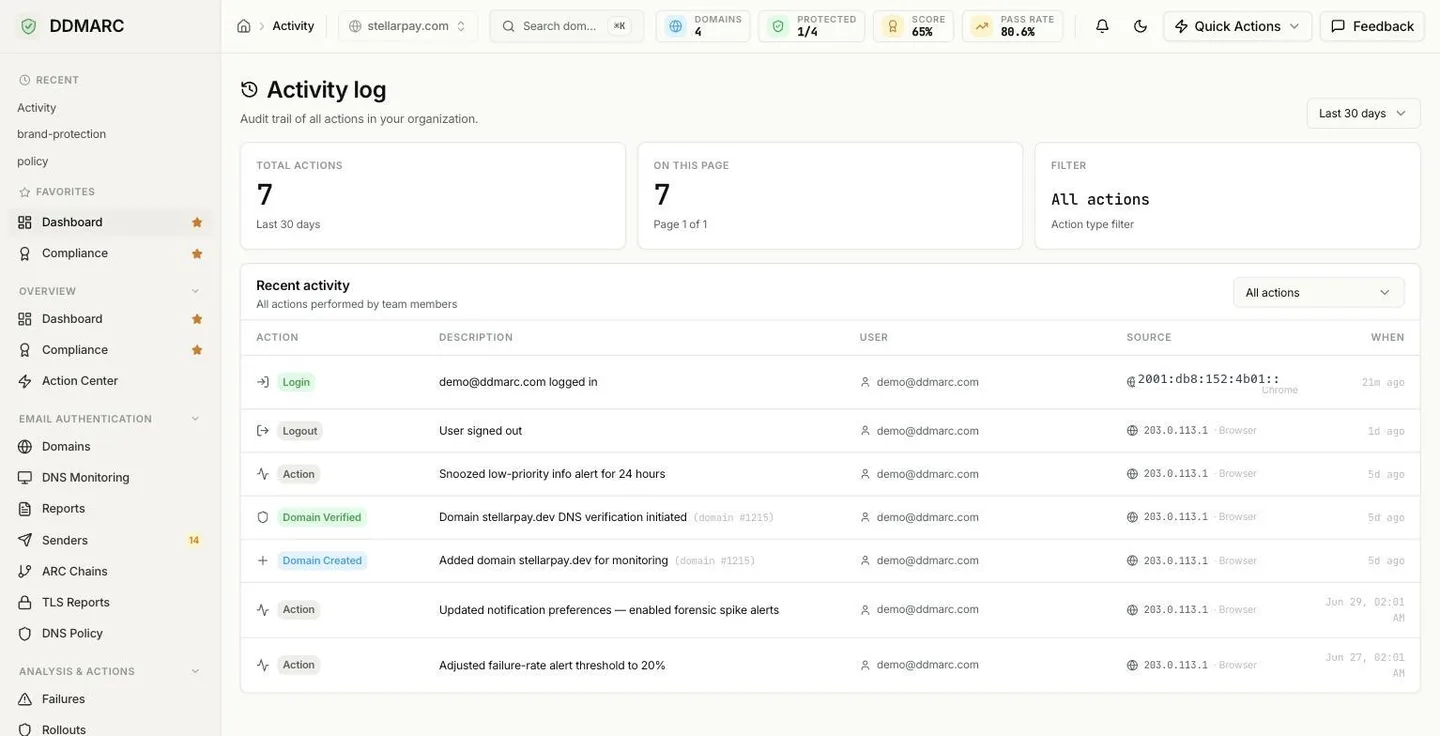
The three tiles
Total actions
Every matching entry in the selected date range — not just the current page.
On this page
How many rows are shown right now, with your position in the result set.
Filter
The action type currently applied, or All actions when unfiltered.
Filtering
Date range
The header selector offers the last 7, 14, 30, 60 or 90 days. That is the maximum lookback the activity API accepts — the audit trail is a security record, not a long-term analytics store.
Action type
The dropdown on the Recent activity card is populated from the live list of recordable action types, so it always matches what the platform can actually log. Changing either filter resets you to the first page.
Table columns
Action
A typed badge — Login, Logout, Domain Created, Domain Verified and so on. Action types without a dedicated badge fall back to a generic Action label, while the raw type still appears in the filter dropdown.
Description
A human-readable summary of what happened, followed by the affected object when the entry has one (for example domain #42).
User
The email address of whoever performed the action, or System for entries with no associated user.
Source
The originating IP address, with the browser inferred from the user agent (Chrome, Edge, Firefox, Safari).
When
A relative timestamp; hover for the exact local date and time.
Results are paginated newest-first, and the pager shows the total count so you always know how much history you are looking at.
Recorded action types
These are the action types the platform records. Not every type will appear in your log — hosted-record and MSP entries only show up if you use those features.
Authentication
- login
- logout
- password_change
Domains
- domain_create
- domain_delete
- domain_verify
- domain_token_rotate
Policy enforcement
- policy_create
- policy_update
- policy_publish
- policy_delete
- policy_schedule
Hosted SPF
- spf_hosting_create
- spf_hosting_update
- spf_hosting_refresh
- spf_hosting_delete
Hosted DKIM
- dkim_hosting_create
- dkim_hosting_rotate
- dkim_hosting_retire
Managed MTA-STS
- mta_sts_hosting_create
- mta_sts_hosting_update
- mta_sts_hosting_delete
Managed BIMI
- bimi_hosting_upsert
- bimi_hosting_delete
Team
- member_invite
- member_remove
- member_role_change
- invitation_cancel
API keys
- api_key_create
- api_key_revoke
Settings
- settings_update
- preferences_update
Reports
- report_export
Alerts
- alert_settings_update
- webhook_test
- alert_rule_create
- alert_rule_update
- alert_rule_delete
- alert_snooze
- alert_unsnooze
Support access
- support_access_enabled
- support_access_disabled
MSP tooling
- msp_prospect_scan
- msp_prospect_scan_export
Support access is recorded too
If you grant DDMARC support temporary access to your account, actions taken during that session are flagged as impersonated and carry the support agent's email address and the stated reason for access. Enabling and disabling support access is itself logged, and the impersonation fields are included in the CSV export.
CSV export
The activity trail can be exported as CSV with the same action and date-range filters. The file contains one row per entry with these columns:
Timestamp,Action,Description,User,IP Address,User Agent,Target Type,Target ID,Is Impersonated,Impersonator Email,Impersonation ReasonA single export is capped at the 50,000 newest matching rows. When the cap is hit the response advertises the truncation in a header, and you can page through the remainder with the JSON API instead.
API endpoints
| Method | Path | Purpose |
|---|---|---|
| GET | /api/v1/activity | Paginated entries. Accepts page, size (up to 100), action, days (1–90) and impersonated. |
| GET | /api/v1/activity/actions | The authoritative list of action types available for filtering. |
| GET | /api/v1/activity/export/csv | CSV download, filtered by action and days. |
All three are scoped to your organization — you never see another tenant's trail.