DNS Monitoring
DDMARC re-reads your email authentication records from public DNS on a schedule, records what it saw, and tells you when something changes. Most authentication outages start with a DNS edit nobody announced.
Open DNS Monitoring from the Email Authentication section of the sidebar for a roll-up across every domain, then click a domain to drill in.
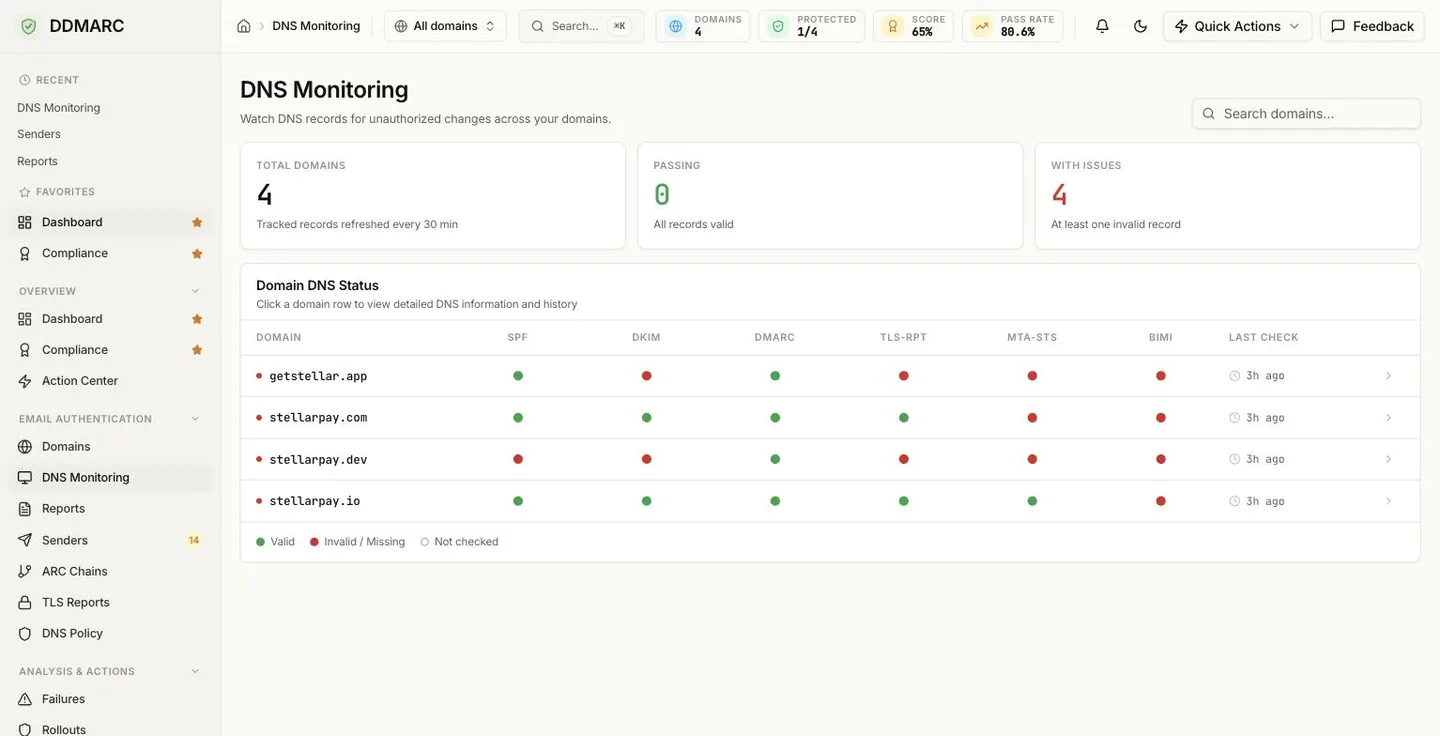
The six monitored records
These six record types are checked, validated and scored. SPF, DKIM and DMARC are monitored on every plan; the other three require Protect or above.
SPF
Authorized sending IPs, including the lookup count
DKIM
Signing keys, checked against your configured selectors
DMARC
Your policy, subdomain policy and reporting addresses
TLS-RPT
Where TLS failure reports should be delivered
MTA-STS
Transport security policy mode and version ID
BIMI
Brand logo location and VMC certificate
What the statuses mean
Each record on each domain is in one of three states. Note the third one — a record that has never been checked is not the same as a broken record.
The record was found and parsed successfully at the last check.
Nothing was published, or what was published failed validation.
No check has covered this record yet. Run Check Now to populate it.
How often checks run
You can set a per-domain interval of 1, 6, 12 or 24 hours, but your plan sets the floor — a faster interval than your plan allows is rejected. On the free Monitor plan there is no scheduled sweep at all: checks only happen when you click Check Now, and because nothing runs in the background, no automated DNS change alerts are sent.
| Plan | Fastest interval | Automated change alerts |
|---|---|---|
| Monitor (free) | Manual checks only | No automated change alerts |
| Protect | Every 24 hours | Yes |
| Growth | Every 12 hours | Yes |
| Professional | Every 6 hours | Yes |
| Partner Starter / Partner | Every 6 hours | Yes |
| Enterprise | Hourly | Yes |
Included from Protect ($29/mo).Start a 14-day trial →See the Protect plan →
Because DNS-derived results come from the last completed check, a DNS change you made five minutes ago will not be reflected until the next scheduled check — or until you run Check Now. Do that after every DNS edit instead of waiting for the sweep.
What you get
Scheduled and manual checks
- Check Now on any domain, on any plan
- Scheduled sweeps from Protect upward
- Per-domain choice of which record types to watch
- Custom DKIM selector list on Professional and above
Change alerts
When a scheduled check finds a record has changed, regressed or recovered, DDMARC raises an alert on your configured channels:
- Email — every paid plan
- Webhook, including Slack and Discord — Protect and above
- Microsoft Teams and Telegram — Growth and above
- Monitor (free) — none, since nothing is checked on a schedule
History and trends
Each domain's detail page carries four KPI tiles — Uptime, Total checks, Changes detected and Check interval — plus a paginated log of every check that has run.
Protect and aboveMulti-domain view
- Totals for domains monitored, passing and with issues
- Per-domain record status at a glance, with search
- Drill-down into any domain's current status and history
Using DNS Monitoring
Open DNS Monitoring
It sits under Email Authentication in the sidebar. The overview lists every domain with the status of each monitored record.
Select a domain
The detail page opens on the Current Status tab: one card per record type with the value found and any validation findings.
Run a check or review the History tab
Check Now runs an immediate lookup. The History tab lists past checks, flagging the ones where something changed.
Adjust settings
The Settings dialog on the detail page controls the check interval, which record types are watched, and the DKIM selectors to query.
Advisory checks: DNSSEC and DANE
Alongside the six scored records, DDMARC also observes DNSSEC signing and DANE/TLSA records for your MX hosts, including a live check that the TLSA record actually matches the certificate the mail server presents.
These are informational only and never change your DNS health grade. They are reported so you can see your posture against a stricter bar, not to penalize you for not deploying them. You will find them on the domain health card on the Domains page, not on this page.
DNS Monitoring API
| Endpoint | Purpose |
|---|---|
| GET /api/v1/dns-monitoring/overview | Status roll-up across every domain |
| GET /api/v1/dns-monitoring/health | Health scores and grades |
| GET /api/v1/dns-monitoring/domains/{domain_id}/history | Past checks for one domain |
| GET /api/v1/dns-monitoring/domains/{domain_id}/trends | Trend metrics (Protect and above) |
| GET /api/v1/dns-monitoring/domains/{domain_id}/settings | Read the monitoring configuration |
| POST /api/v1/dns-monitoring/domains/{domain_id}/check-now | Run an immediate check |
Not available yet — DNS monitoring exports and record diffs
Monitoring history cannot be exported — the three available CSV exports are DMARC reports, senders and the activity log (see Data Exports). There is also no side-by-side diff of two checks; the History tab flags which checks detected a change, and the Current Status tab shows the value in place today.
Features by plan
| Feature | Monitor | Protect | Growth | Professional + |
|---|---|---|---|---|
| SPF / DKIM / DMARC monitoring | ||||
| Manual Check Now | ||||
| TLS-RPT / MTA-STS / BIMI monitoring | — | |||
| Scheduled checks and change alerts | — | |||
| Trend KPIs and check history | — | |||
| Custom DKIM selectors | — | — | — |
Enterprise, Partner Starter and Partner include everything in the Professional column.