TLS Reports
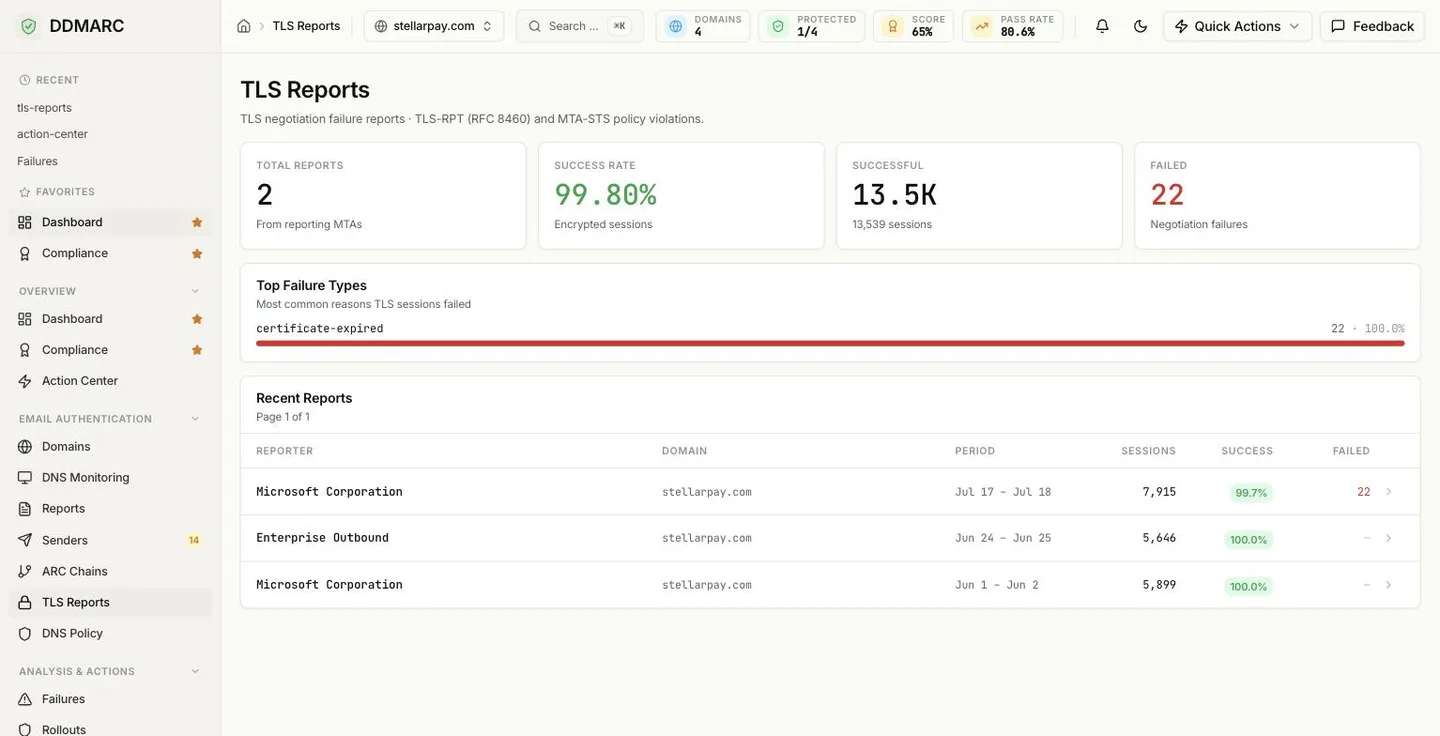
TLS negotiation failure reports — TLS-RPT (RFC 8460) and MTA-STS policy violations. Where DMARC tells you who is sending as you, TLS-RPT tells you whether mail sent to you actually arrived over an encrypted connection.
In the dashboard: TLS Reports, under Email Authentication.
Protect plan feature
TLS-RPT report analysis is available on Protect, Growth, Professional, Enterprise, Partner Starter and Partner plans. On Monitor the page shows an upgrade screen.
Included from Protect ($29/mo).Start a 14-day trial →See the Protect plan →
What TLS-RPT reports tell you
SMTP encryption is opportunistic by default. If a sending server tries STARTTLS and the handshake fails, the usual outcome is that the message is delivered in the clear anyway — or, once you publish a strict MTA-STS policy, not delivered at all. Neither outcome shows up in your own logs in a useful way, because the failure happened on the sender's side.
TLS-RPT closes that gap. Large providers keep a daily tally of their TLS sessions to your domain and send you a JSON report: how many sessions succeeded, how many failed, and the specific reason for each failure. DDMARC parses those reports and aggregates them, so an expiring certificate on one MX host becomes visible as a spike, not a support ticket three weeks later.
Turning reporting on
TLS-RPT is enabled by a single TXT record at _smtp._tls under your domain, naming the address that should receive reports.
Name:  _smtp._tls.example.com
Type:  TXT
Value: v=TLSRPTv1; rua=mailto:your-token@rua.ddmarc.com
Use your own address, not the example
The local part is a per-domain token unique to your domain — the value above is a placeholder. The TLS Reports page shows the exact record for each of your domains, with a copy button, whenever no reports have arrived yet. Copy it from there.
Already have a TLS-RPT record pointing somewhere else? You do not have to choose: rua accepts a comma-separated list, so add the DDMARC address alongside your existing destination.
Reports are generated daily by the sending provider, so expect the first data a day or two after publishing the record — and only from providers that actually send you mail.
TLS-RPT and MTA-STS go together
MTA-STS is the policy that tells senders "always use TLS with a valid certificate when delivering to me". TLS-RPT is the feedback channel that tells you whether anyone is failing that policy. Publishing MTA-STS in enforce mode without TLS-RPT means silent delivery failures; publishing TLS-RPT first lets you move to enforce with evidence.
Reading the page
Total Reports
How many TLS-RPT reports have been received from reporting MTAs in the period.
Success Rate
Share of sessions that were encrypted. Anything below 99% is worth a look; below 95% is colored as a problem.
Successful
Total count of successfully negotiated TLS sessions.
Failed
Total negotiation failures — the number the Top Failure Types card then explains.
Top Failure Types
Failure reasons ranked by how many sessions each one cost you, with a count and a share of all failures. The reason strings come from the reports themselves, so they follow the RFC 8460 vocabulary:
certificate-expiredYour server presented a certificate that had already expired.
certificate-not-trustedThe certificate chain did not validate against the sender's trust store.
certificate-host-mismatchThe certificate did not cover the MX hostname the sender connected to.
starttls-not-supportedThe receiving server did not offer STARTTLS at all.
validation-failureTLS negotiation failed for another reason during the handshake.
sts-policy-fetch-errorThe sender could not retrieve your MTA-STS policy file.
Other result types defined by the RFC can appear — the card shows whatever your reporters actually sent.
Recent Reports
One row per received report: the Reporter (the provider that sent it), the Domain it covers, the reporting Period, total Sessions, the Success percentage and the Failed count. Click through for the per-policy breakdown and the individual failure details inside that report.
Acting on a failure
Certificate problems
Expired, untrusted or mismatched certificates are the most common cause. Check every MX host, not just the primary — a backup MX with a stale certificate produces failures that are invisible in normal delivery testing.
STARTTLS not offered
A host in your MX set is accepting plaintext connections without advertising STARTTLS. Fix it before enforcing MTA-STS, or mail to that host will start being refused outright.
Policy fetch errors
Senders could not retrieve your MTA-STS policy file. Usually the policy host is unreachable, serving the wrong content type, or its own certificate is invalid. See Setting up MTA-STS.
Uploading a report by hand
If a report was delivered to a mailbox you already own, you can feed it in directly without re-pointing your DNS. Reports are JSON, optionally gzipped, and the target domain is taken from the policy inside the report.
POST /api/v1/tls-rpt/upload
The domain named in the report must already exist in your organization, otherwise the upload is rejected.
Retention
TLS reports follow the same retention window as the rest of your data — 30 days on Monitor and 1 year on Protect, Growth, Professional and the Partner plans, and a custom window on Enterprise. Reports older than your window are filtered out of both the list and the summary statistics.
API endpoints
| Method | Path | Purpose |
|---|---|---|
| GET | /api/v1/tls-rpt | List received TLS-RPT reports, paginated, filterable by domain |
| GET | /api/v1/tls-rpt/{report_id} | One report with its policies and per-failure detail |
| GET | /api/v1/tls-rpt/stats/summary | Aggregated session counts, success rate and top failure types |
| POST | /api/v1/tls-rpt/upload | Upload a TLS-RPT report file (JSON or gzipped JSON) |