DNS Policy
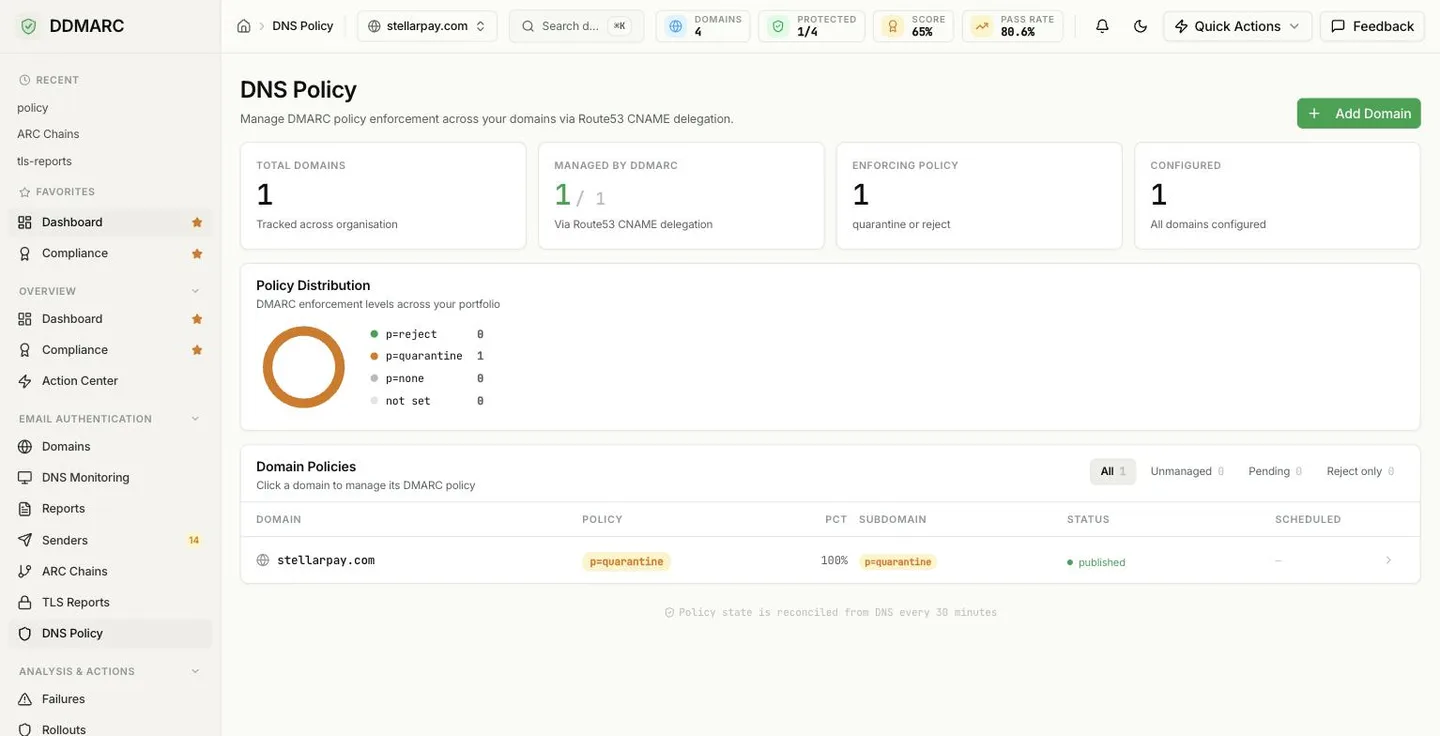
Manage DMARC policy enforcement across your domains via CNAME delegation. DDMARC keeps the DMARC record for you, so changing your policy is a click in the dashboard, not a DNS edit.
In the dashboard: DNS Policy, under Email Authentication.
Hosted policy management is a Professional feature
Every plan can view the DNS Policy page and see the policy each domain is currently publishing. Creating, publishing and scheduling a hosted policy requires the Professional plan or above (Professional, Enterprise, Partner Starter and Partner).
Included from Professional ($99/mo).Start a 14-day trial →See the Professional plan →
What CNAME delegation means for you
Normally your DMARC policy lives in a TXT record at _dmarc.example.com, and every policy change means another ticket with whoever owns your DNS. With delegation you make one DNS change, once. After that DDMARC owns the record contents.
DDMARC publishes your record in its own hosted zone
When you publish a policy, the DMARC TXT record is written to a DDMARC-managed Amazon Route 53 hosted zone at example.com.dmarc.ddmarc.com. The exact hostname for your domain is shown on the domain's policy screen.
You add one CNAME, once
In your own DNS you point _dmarc.example.com at that hostname with a CNAME. Resolvers follow the CNAME and read the record DDMARC publishes.
_dmarc.example.com. CNAME example.com.dmarc.ddmarc.com.Policy changes no longer touch your DNS
Moving from p=none to p=quarantine to p=reject, adjusting pct, or changing alignment is done in DDMARC and takes effect as soon as the hosted record updates. This is also what makes automated policy rollouts possible without a human in the loop.
A CNAME replaces the whole record
A hostname cannot have both a CNAME and a TXT record. Remove any existing_dmarc TXT record when you add the delegation CNAME, otherwise your DNS provider will reject the change or resolvers will see a conflicting answer.
Reading the page
Total Domains
Every domain tracked across your organization.
Managed by DDMARC
How many of those domains have a published hosted record — shown as x / y, via CNAME delegation.
Enforcing Policy
Domains at quarantine or reject. This is the number that actually stops spoofed mail.
Configured
Domains with a saved policy configuration, published or not. The hint tells you how many are still awaiting setup.
Policy Distribution
A donut breaking your portfolio into four buckets: p=reject, p=quarantine, p=none and not set. "Not set" means the domain has no DMARC policy recorded at all — those are the domains an attacker can spoof freely.
Domain Policies table
One row per domain: Domain, Policy badge, Pct, Subdomain policy badge, Status and any Scheduled change. Click a row to open that domain and edit its record. The filter pills above the table narrow it down:
All
Every tracked domain
Unmanaged
No published hosted record
Pending
Configured but not yet published
Reject only
Domains already at p=reject
Status values
publishedThe record is live in the DDMARC hosted zone and your CNAME is in place.
draftA policy configuration exists but has not been published yet.
not configuredNo hosted policy configuration exists for this domain yet.
Policy state is reconciled from DNS every 30 minutes
The page footer says this for a reason: what you see is the last reconciled view, not a live lookup performed as the page renders. DDMARC re-reads the published records on a schedule and updates each domain's status and verification timestamp. If you have just added your delegation CNAME, or just published a change, give it a cycle before treating the status as wrong. To force an answer for a single domain, call GET /api/v1/domains/{domain_id}/policy/status, which compares the expected record against what is actually published.
Scheduling a policy change
You do not have to flip a policy at the moment you happen to be looking at the dashboard; you can schedule it. A scheduled change is stored against the domain, shows up in the Scheduled column as → quarantine, and is applied and published automatically when its time arrives.
Good for a one-off step
"Move this domain to quarantine on the 1st, after the campaign ends." One change, one date, applied for you.
Use a rollout for the whole journey
If you want the full none → quarantine → reject progression with safety gates that pause on a drop in pass rate, use Policy Rollouts instead of a chain of scheduled changes.
Before you enforce
- Confirm every legitimate sender is aligned. The aggregate reports tell you who is still failing.
- Preview the blast radius with
GET /api/v1/domains/{domain_id}/simulate-policybefore you publish an enforcing policy. - Step through
pctif you have high volume — enforcement applies to a percentage of mail first. - Set the subdomain policy deliberately. Leaving it unset means subdomains inherit the organizational policy, which is often stricter than you intended for a legacy sub-domain sender.
API endpoints
Everything the DNS Policy page does is available over the API. All paths are relative to the API base URL and use the /api/v1 prefix.
| Method | Path | Purpose |
|---|---|---|
| GET | /api/v1/policies | List every domain with its policy configuration status |
| GET | /api/v1/domains/{domain_id}/policy | Read the full policy configuration for one domain |
| POST | /api/v1/domains/{domain_id}/policy | Create a policy configuration (optionally publish immediately) |
| PATCH | /api/v1/domains/{domain_id}/policy | Partial update — only the fields you send are changed |
| DELETE | /api/v1/domains/{domain_id}/policy | Remove the record from the hosted zone, keeping the saved configuration |
| POST | /api/v1/domains/{domain_id}/policy/publish | Publish the current configuration to the hosted zone |
| POST | /api/v1/domains/{domain_id}/policy/schedule | Schedule a future policy change |
| GET | /api/v1/domains/{domain_id}/policy/status | Check publication and DNS verification status |
| GET | /api/v1/domains/{domain_id}/simulate-policy | Preview the impact of a policy before enforcing it |