Policy Rollouts
Automated DMARC policy progression with safety gates — pause on breach, resume when healthy. A rollout walks a domain from p=none to your target policy one stage at a time, and refuses to advance while your authentication numbers say it is unsafe.
In the dashboard: Rollouts, under Analysis & Actions.
Policy Rollouts start on Professional
Rollouts are part of policy automation, which is included on Professional, Enterprise, Partner Starter and Partner. With the hosted policy delegation described in DNS Policy, each stage can auto-publish without a DNS edit.
Included from Professional ($99/mo).Start a 14-day trial →See the Professional plan →
Why a rollout instead of just switching to reject
Going straight to p=reject is only safe once every legitimate sender is aligned. In practice there is always one forgotten invoicing system, one marketing tool, one team using a personal relay. Enforce too early and that mail is silently discarded by the receiver.
A rollout replaces "flip it and hope" with a ladder of stages plus an automatic check between each one. The check runs on your real aggregate report data. If the numbers are healthy the rollout moves up a rung; if they are not, it stops and tells you.
How the safety gate works
A scheduled job checks each active rollout once its stage wait period has elapsed. Two conditions are evaluated against the last 7 days of aggregate report data for the domain:
Minimum pass rate
The share of mail where both SPF and DKIM passed. Default 95%, adjustable from 50% to 100% when you create the rollout. Fall below it and the rollout is blocked with Pass rate X% below threshold Y%.
Minimum email volume
How many messages must be observed before the pass rate is trusted at all. Default 100, adjustable from 10 to 500. Too little data and the rollout is blocked with Insufficient email volume instead of advancing on a sample of three emails.
Consecutive checks, not a single lucky reading
Passing the gate once is not enough. Each passing check increments a counter, and the rollout only advances once it has accumulated the required number of consecutive passing checks (two by default). A failing check resets progress and blocks the rollout.
Blocked is a stop, not a rollback
When a gate fails, the rollout stops at its current stage and an alert is raised. The policy already published stays published — nothing is reverted automatically. Fix the failing sender, then move the rollout forward yourself.
Pausing, resuming and recovering
Pause
Available on active and blocked rollouts. Freezes progression. The remaining wait time is preserved — resuming pushes the next transition out by however long you were paused.
Resume
Only valid on a paused rollout. Returns it to active and re-arms the gate checks.
Skip stage
Advances to the next stage immediately, bypassing the gate. Use when you know why the gate failed and have already fixed it.
Rollback
Steps back to the previous stage and returns the rollout to active. Use when enforcement started hurting real mail.
A blocked rollout is brought back to life in one of three ways: Skip stage to move on, Rollback to step down, or Pause and then Resume once the underlying problem is fixed — resume alone does not apply to a blocked rollout, only to a paused one.
Rollout statuses
pendingCreated but not started yet.
activeHealthy and advancing on schedule.
pausedManually held. Resume when you are ready.
blockedA safety gate failed. Needs your attention.
completedReached the target policy.
cancelledAbandoned before reaching the target.
The page's Paused tile and filter tab count paused and blocked together — both mean "this rollout is not moving without you".
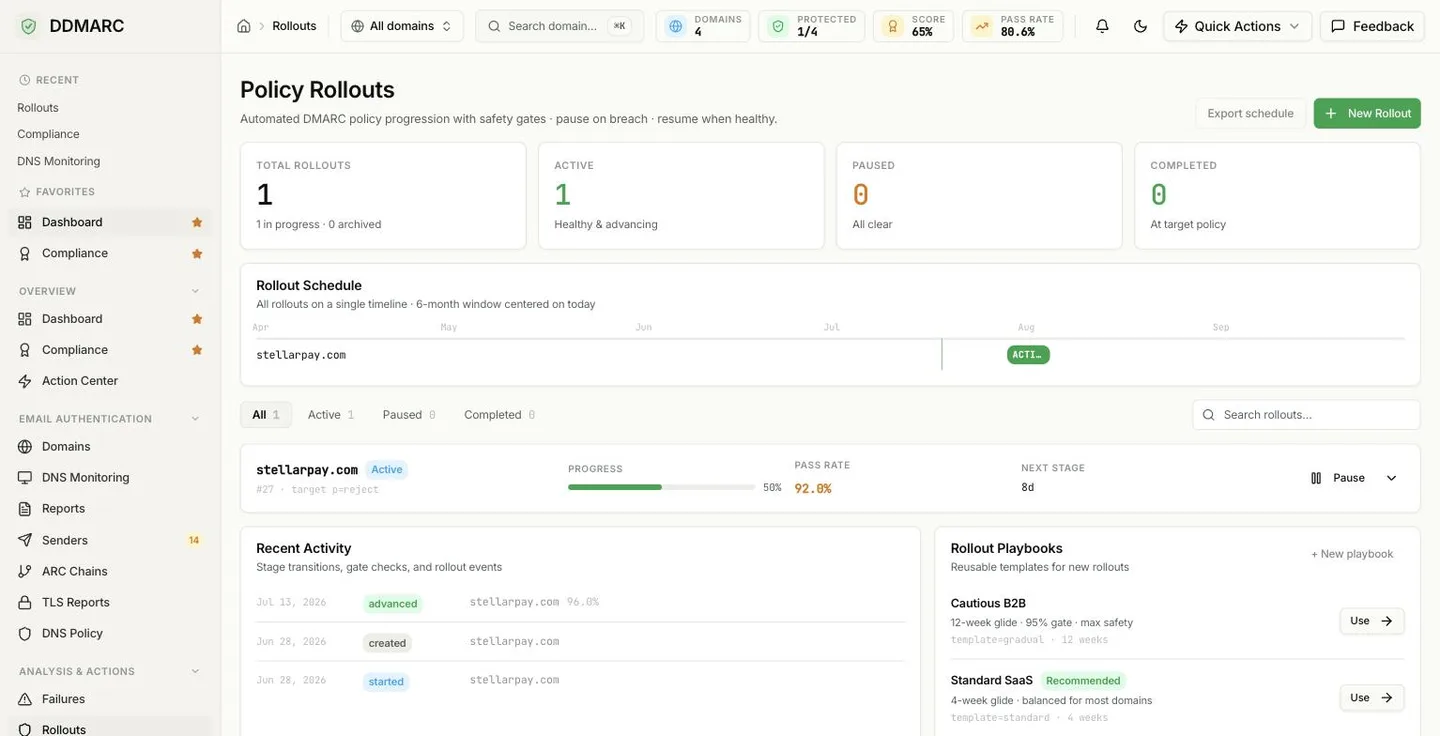
Reading the page
Total Rollouts
Everything ever created, split into how many are in progress and how many are archived.
Active
Healthy and advancing.
Paused
Paused plus blocked. The hint tells you how many are blocked by a gate.
Completed
Domains sitting at their target policy.
Rollout Schedule
Every rollout drawn on one timeline, in a six-month window centered on today. It is the fastest way to see when domains are due to reach enforcement and whether they are bunched onto the same week. The timeline is read-only — you change dates by acting on a rollout, not by dragging it.
Rollout rows
Each row shows the domain, a status badge, the rollout identifier and target (for example #12 · target p=reject), progress through the stage ladder, the latest pass rate, how long until the next stage, and a pause control. Expand a row for the full stage timeline, the gate-breach reason if there is one, and the skip / rollback / cancel actions.
Recent Activity
Stage transitions and rollout events across your domains — created, started, advanced and the rest, each with the pass rate recorded at that moment. The feed is assembled from the per-rollout history and covers your most recent rollouts, not the entire archive.
Not available yet — Export schedule
The Export schedule button on the Rollouts page is present but disabled — there is no rollout schedule export today. To get the same data now, read GET /api/v1/rollouts, which returns each rollout with its stage, progress, pass rate and next transition time.
Stage ladders
Three built-in ladders decide how many stages a rollout has and how long it waits at each one. Choosing quarantine as your target instead of reject drops the reject stages from the ladder.
Standard
Standard (4 weeks)Balanced. Two weeks of observation at each step before enforcement.
p=none (14 days) → p=quarantine (14 days) → p=reject
Gradual
Gradual (6+ weeks)Conservative. Percentage ramps at both quarantine and reject, for high-volume domains.
p=none (14d) → p=quarantine pct=10 (7d) → pct=50 (7d) → pct=100 (7d) → p=reject pct=50 (7d) → p=reject pct=100
Fast
Fast (2 weeks)Aggressive. Skips the observation stage — only for domains you already understand.
p=quarantine (7 days) → p=reject
Rollout Playbooks
Playbooks are reusable presets that pre-fill the Create Rollout wizard — pick one, confirm the domain, done. They are shipped presets: there is no custom-playbook store yet, and the + New playbook control is disabled for that reason.
Cautious B2B
template=gradual · 12-week glide · 95% gate · max safety
Standard SaaS
Recommendedtemplate=standard · 4-week glide · balanced for most domains
Fast Cleanup
template=fast · 2-week glide · for low-volume domains
Monitor Only
Not selectableStay at p=none, no progression
Monitor-only is the absence of a rollout — leave the domain at p=none and no rollout is needed.
Creating a rollout
New Rollout opens a three-step wizard. A domain can only have one rollout in flight at a time, so domains that already have one are not offered.
Pick the domain
Only domains without an active rollout appear here.
Choose target policy and speed
Target is quarantine or reject; speed selects the stage ladder — Standard, Gradual or Fast.
Set the safety gates
Minimum pass rate (default 95%), minimum email volume (default 100), and whether to auto-publish each stage to DNS. Auto-publish requires the hosted policy delegation described in DNS Policy; leave it off and you publish each stage yourself.
Auto-publish and DNS delegation
With auto-publish on, each stage transition writes the new DMARC record for you. That requires DDMARC to own the record, which is what the CNAME delegation in DNS Policy sets up. Without delegation, keep auto-publish off and use the rollout as a scheduler: GET /api/v1/domains/{domain_id}/rollout/dns returns the exact record the current stage expects.
Getting a clean run
- Collect reports for a few weeks before starting. A rollout gated on volume will simply sit blocked on a domain with no data.
- Fix known-failing senders first — check your aggregate reports for sources that are not aligned.
- Do not lower the pass-rate threshold to unblock a rollout. The gate is telling you real mail would be rejected.
- Stagger domains across the schedule instead of starting the whole portfolio the same day — one bad week then blocks everything at once.
Prefer not to run this yourself?
The Enforcement sprint takes a domain from none to reject in about 30 days, up to 60 for a complex estate, third-party senders included ($2,500 per domain, one-time). For ongoing coverage, Managed DMARC gives you a named specialist, a monthly review and a written report ($99 per domain per month, billed annually).
Talk to usAPI endpoints
Rollout verbs are actions on a domain's current rollout, not on a rollout id. All paths use the /api/v1 prefix.
| Method | Path | Purpose |
|---|---|---|
| GET | /api/v1/rollouts | List every rollout in the organization with status counts |
| GET | /api/v1/domains/{domain_id}/rollout | The current rollout for a domain, including its full stage ladder |
| POST | /api/v1/domains/{domain_id}/rollout | Create a rollout (template, target policy, gate thresholds, auto-publish) |
| DELETE | /api/v1/domains/{domain_id}/rollout | Cancel the active rollout |
| POST | /api/v1/domains/{domain_id}/rollout/start | Start a pending rollout |
| POST | /api/v1/domains/{domain_id}/rollout/pause | Pause an active or blocked rollout |
| POST | /api/v1/domains/{domain_id}/rollout/resume | Resume a paused rollout |
| POST | /api/v1/domains/{domain_id}/rollout/skip | Advance to the next stage now, bypassing the gate |
| POST | /api/v1/domains/{domain_id}/rollout/rollback | Step back to the previous stage |
| POST | /api/v1/domains/{domain_id}/rollout/publish | Publish the current stage record manually |
| GET | /api/v1/domains/{domain_id}/rollout/history | Stage transitions and gate checks for the rollout |
| GET | /api/v1/domains/{domain_id}/rollout/dns | The DNS record for the current stage |